


Reproducing the April 3, 33 AD Lunar Eclipse in Stellarium
This page supports the Chronology of Christ article, which argues Jesus was crucified on Friday, April 3, 33 AD. A partial lunar eclipse rose over Jerusalem at sunset that day. Here is how to see it for yourself in the free astronomy software Stellarium.
The image below shows a simulation of the April 3, 33 AD lunar eclipse in Stellarium, with the green at the bottom representing the horizon:
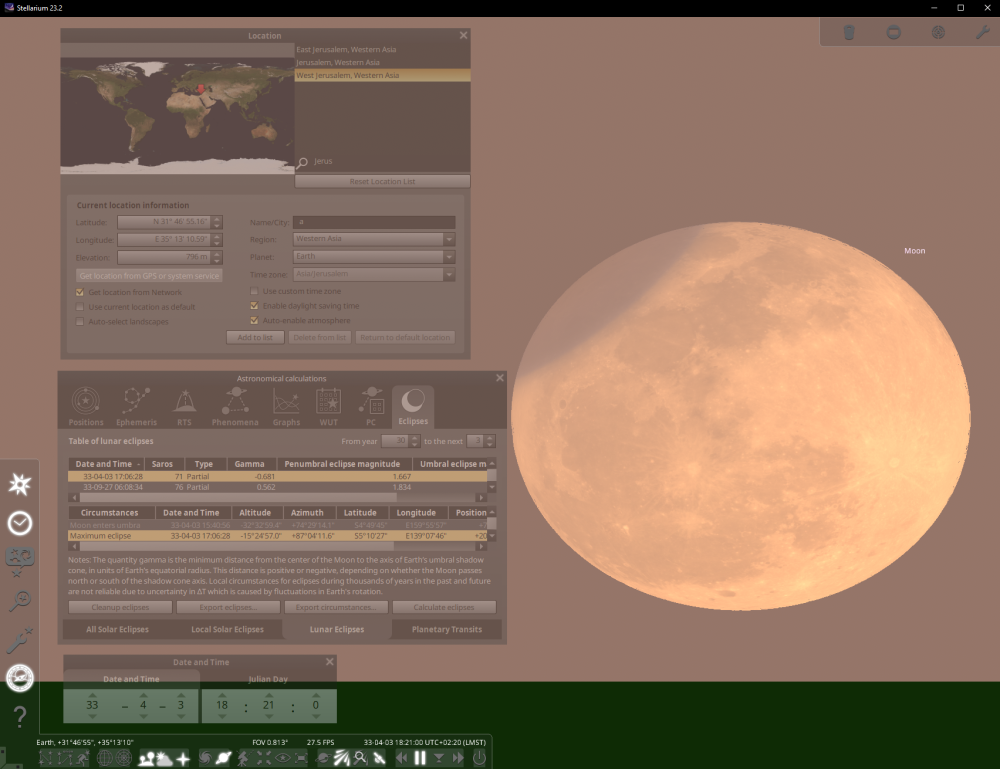
To reproduce this lunar eclipse in Stellarium:
- Download, install, and run Stellarium. Avoid the web version as it lacks many features and seems to be less accurate.
- On the bottom left menu, click the "Location Window" icon, type "Jerusalem" in the search box, and click one of the Jerusalem locations.
- On the same bottom left menu, click the "Astronomical Calculations Window" icon.
- Select "From year" 30 and "to the next "3" years.
- Click the Lunar Eclipses tab at the bottom, then click "Calculate eclipses."
- Click on the "33-04-03 17:06:28" row in the table.
- Click the "Date and Time Window" on the same bottom left menu and set the time to 18:21:00 to move the moon above the horizon.
- Use the mouse scroll wheel or swipe two fingers at a time on the touchpad to zoom, drag the window to find the moon.